

Quick Summary
Pharmaceutical ERP software connects formula management, approved revisions, batch scaling, production execution, MBR/BMR records, quality checks, and traceability in one workflow. Instead of relying on disconnected spreadsheets and documents, pharma teams can maintain controlled formula versions, calculate production quantities, record actual batch activity, and connect materials, operators, quality results, and finished batches.
Table Of Contents
Introduction
Pharmaceutical manufacturing becomes difficult when formulas, revisions, production quantities, batch records, inventory, and quality information live in separate systems. Pharmaceutical ERP software brings these processes together so teams can move from an approved formula to a correctly scaled production batch and a traceable production record. The result is a connected workflow for formulation, manufacturing, documentation, quality, and batch history.
Key Takeaways
Pharma ERP software can maintain controlled formula versions, revisions, and approval status.
Batch scaling converts an approved formula into production quantities for a defined batch size.
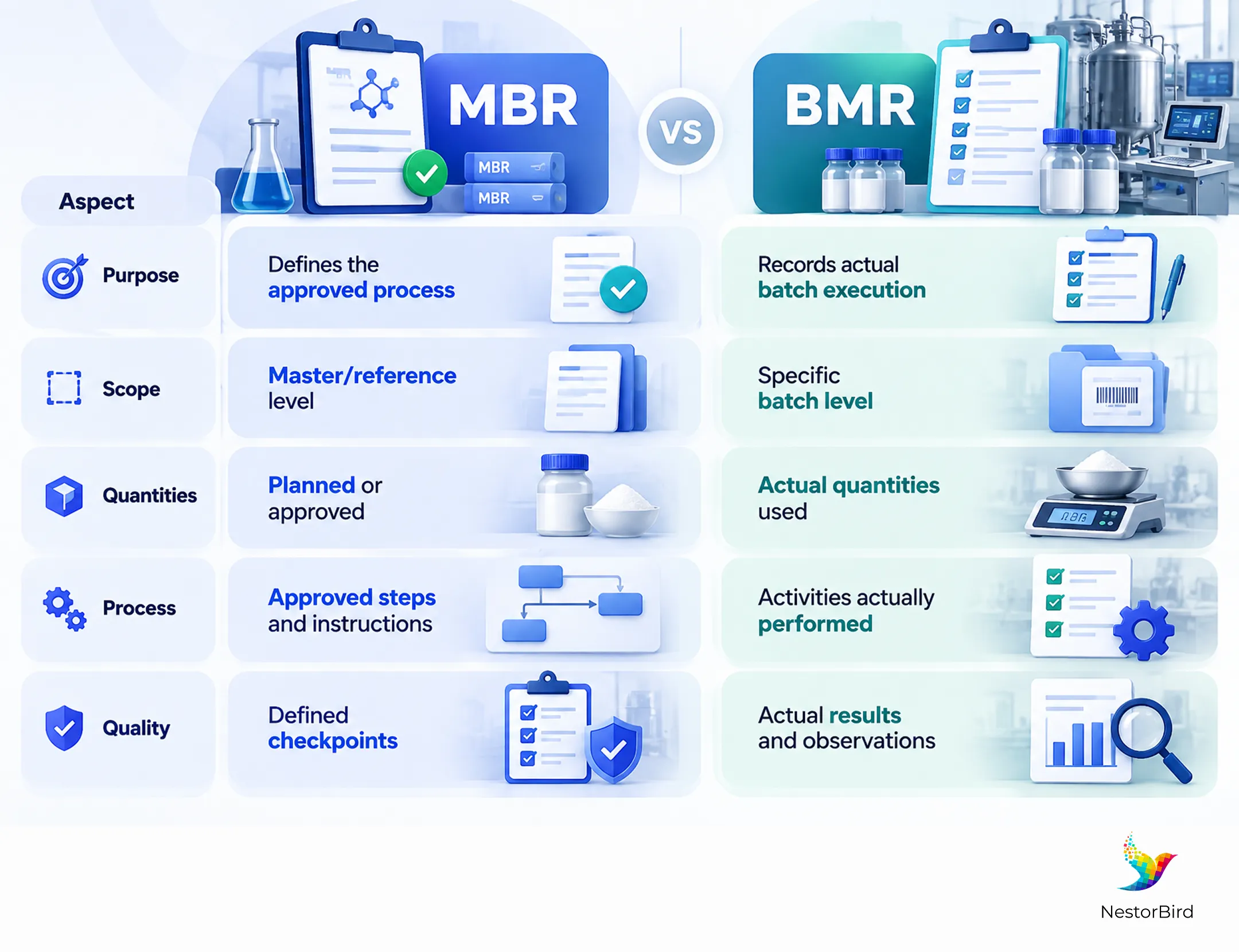
The Master Batch Record (MBR) defines the approved process, while the Batch Manufacturing Record (BMR) captures actual execution.
Electronic records can connect materials, lots, operators, production activities, and quality checks.
Integrated traceability creates a connected history from raw materials through production and finished batches.
How Pharma ERP Manages Formula Changes and Version Control
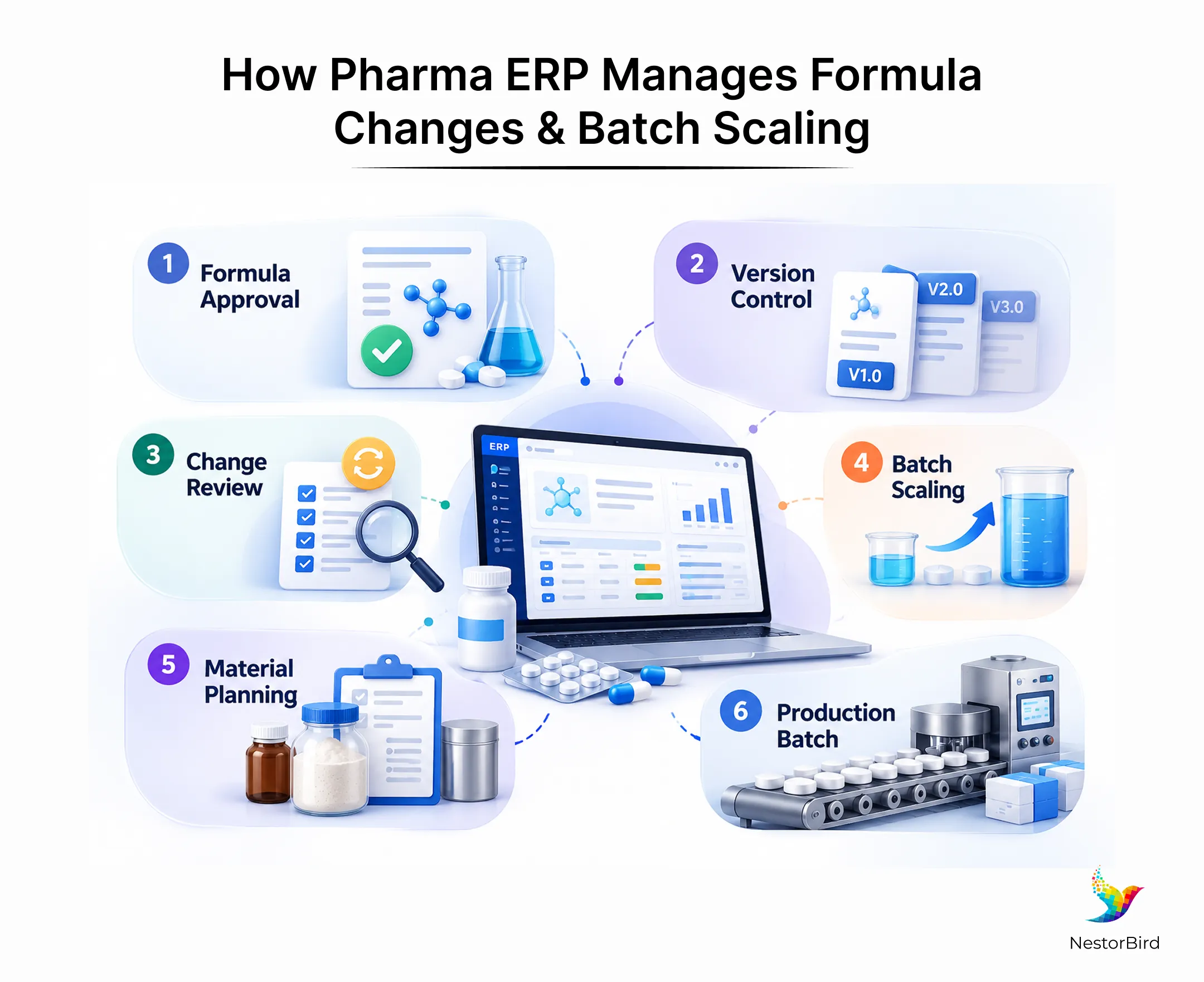
A formula change may involve an ingredient, quantity, process step, or specification. In pharmaceutical manufacturing, that change can affect purchasing, inventory, production, quality, costing, packaging, and documentation. A controlled ERP workflow gives teams a structured way to identify the current formula, preserve previous versions, document a proposed revision, route it for review, establish an effective date, and make the approved version available for production.
Formula Versioning and Approval
Formula versioning helps formulation, QA/QC, production, and management teams work from the same approved information. A useful system can retain ingredients, quantities, revision details, approval status, and effective dates for each version.
This becomes especially important when a product has multiple revisions. A controlled formula record reduces the risk of production using an outdated spreadsheet or document while another department is already working with a newer version.
For the detailed pharmaceutical workflow, see our pharmaceutical ERP software solution page.
What Happens When a Formula Changes?
A practical formula change process can follow a simple sequence: Proposed Change → Review → Approval → New Version → Effective Date → Production Use. The key is that the change should not automatically become the production formula simply because someone edited a record.
The organization should define its own approval rules, responsibilities, documentation, and validation procedures. ERP can support that controlled process by connecting the approved formula to material requirements, production planning, inventory, work orders, batch documentation, and costing.
Batch Scaling and Quantity Calculations
Once a formula is approved, the next challenge is converting it into the quantities required for a specific production batch. Batch scaling in pharmaceutical manufacturing means adjusting quantities according to the target batch size while preserving the approved relationships and units defined by the formula.
A centralized system can reduce repeated manual calculations and keep the relationship between the approved formula and the production batch visible to the relevant teams.
From Formula to Production Batch
A production batch normally begins with a target quantity. The system then translates the approved formula into the quantities needed for that batch and considers relevant units, expected yield, material availability, material lots, and packaging requirements.
A connected batch management software workflow can therefore bring planning information and production requirements into the same process instead of relying on separate calculations and spreadsheets.
Target batch size and approved formula version
Ingredient quantities, units, and conversions
Expected yield and material availability
Material lots and packaging requirements
Why Controlled Batch Scaling Matters
Manual batch scaling creates opportunities for calculation, transcription, unit, and version errors. Even a mathematically correct calculation can produce the wrong result if it starts from an outdated formula.
Controlled scaling helps teams understand how planned quantities were derived and which approved formula was used. Scientific assessment and process validation remain essential; ERP provides the information structure around those activities.
MBR: The Approved Blueprint for Pharmaceutical Production
The Master Batch Record (MBR) represents the approved manufacturing blueprint for a product. Depending on the operation, it can define required materials, quantities, manufacturing steps, equipment, expected yields, process controls, and quality checkpoints.
The important distinction is that the MBR describes what should happen. It is not the complete history of one specific batch. FDA guidance describes master production instructions as including material quantities or ratios, production equipment, processing instructions, sampling and in-process controls, and expected yields.
BMR: Recording What Actually Happened During Production
The Batch Manufacturing Record (BMR) captures the actual execution of a specific batch. It can record material consumption, lot numbers, operators, production activities, actual quantities, yields, observations, in-process checks, deviations, and final production information.
This creates a batch-specific history that can be reviewed alongside the approved master instructions. The distinction is simple: the MBR defines the approved process, while the BMR records the execution of that process.
MBR vs. BMR
Aspect | MBR | BMR |
|---|---|---|
Purpose | Defines the approved process | Records actual batch execution |
Scope | Master/reference level | Specific batch level |
Quantities | Planned or approved | Actual quantities used |
Process | Approved steps and instructions | Activities actually performed |
Quality | Defined checkpoints | Actual results and observations |
Electronic Batch Records and Pharmaceutical Batch Traceability
Electronic batch records are more useful when they connect production activity with materials, lots, operators, quality checks, and batch identifiers. That creates a searchable production history instead of a collection of isolated digital forms.
Pharmaceutical batch traceability depends on being able to follow the history of materials and production activities. A connected system can link raw-material lots, production batches, quality checks, packaging information, and finished goods.
For regulatory context, FDA guidance on electronic records and signatures explains that Part 11 applies to certain records maintained electronically under applicable regulatory requirements.
How Pharma ERP Connects Formula, Production, Inventory and Quality
The real value of pharma ERP appears when individual processes stop behaving like separate islands. Formula management should connect to production, production to inventory, inventory to material lots, manufacturing to quality, and quality to the batch record.
A practical workflow is:
Approved Formula → Batch Scaling → Material Availability & Lot Selection → Production/Work Order → MBR/BMR → Quality Inspection → Finished Batch → Traceability & Reporting.
Connecting Formulation, Materials, Inventory and Quality
Imagine that the formulation team approves a new formula version. Production plans a batch using that version, the required quantities are calculated, inventory is checked, and relevant material lots are selected.
During manufacturing, actual consumption and process information are recorded. Quality inspections then stay connected to the batch instead of becoming separate records. This gives production, QA/QC, inventory, procurement, and management a shared operational picture.
For the broader manufacturing workflow, see pharmaceutical manufacturing ERP capabilities covering production, inventory, work orders, quality, and manufacturing operations.
GMP and Documentation Support: What ERP Can and Cannot Do
ERP can support controlled pharmaceutical documentation through revision histories, approval workflows, audit trails, electronic records, quality checks, batch documentation, and traceability. These capabilities can help an organization create more consistent processes and make records easier to retrieve.
However, software alone does not guarantee GMP or regulatory compliance. Compliance depends on system configuration, validation, access controls, procedures, training, data integrity controls, change management, and the organization’s specific regulatory obligations.
FDA guidance states that GMP-related computerized systems should be validated and should have controls for unauthorized access or changes. It also calls for documented change procedures and records of system changes. This makes implementation and governance just as important as the software features themselves.
For production monitoring, BOMs, work orders, quality inspection, and batch/serial tracking, see manufacturing ERP software from NestorBird.
Conclusion
A pharma ERP workflow connects information that is often separated across departments. The journey starts with a controlled formula and approved revision, moves through batch scaling and material availability, and continues into production, MBR/BMR records, quality checks, electronic documentation, and batch traceability.
The goal is not simply to replace paper. It is to create a connected operational history in which formula changes, approved quantities, material lots, production activities, and quality results remain logically connected.
A pharma-focused ERP can support this model when it is appropriately configured, validated, controlled, and aligned with the manufacturer’s procedures and regulatory responsibilities.

Frequently Asked Questions
Pharma ERP software can maintain formula versions, revision histories, approval status, effective dates, and related production information. A controlled workflow can move a proposed formula change through review and approval before the new version becomes available for production.
Batch scaling means converting an approved formula into the quantities required for a specific production batch size. ERP can centralize the calculation and connect it to material requirements, inventory, production planning, and batch records.
The Master Batch Record defines the approved manufacturing process. The Batch Manufacturing Record documents the actual execution of a specific batch, including material usage, production activities, results, observations, and deviations.
ERP can connect electronic production records with materials, lots, operators, production activities, quality inspections, quantities, yields, and deviations. The system must still be appropriately configured, validated, secured, and governed for its intended use.
Pharma ERP can connect raw-material lots, inventory movements, production batches, quality inspections, packaging information, and finished goods. This creates a connected history that can support investigations and batch genealogy.
Yes. ERP can support controlled documents, revision histories, approval workflows, audit trails, electronic records, quality checks, batch records, and traceability. Software alone does not guarantee GMP compliance; implementation, validation, procedures, training, and controls remain essential.
A connected ERP can link an approved formula to batch scaling, material requirements, inventory lots, production orders, MBR/BMR records, and quality inspections. This creates one workflow from formulation through finished-batch traceability.