
Quick Summary
Healthcare ERP works by connecting patient records, clinical services and administrative departments through shared information and integrated workflows. From registration and appointments to laboratory requests, pharmacy, billing and discharge, healthcare ERP software helps authorized teams access updated information. It also links inventory, finance, staffing and reporting, giving hospital managers a clearer picture of daily operations.
Table Of Contents
Introduction
A patient may visit registration, consultation, diagnostics, pharmacy and billing during a single hospital visit. When these departments use disconnected systems, staff may need to enter the same details repeatedly or wait for updates from another team. Healthcare ERP connects clinical and administrative workflows so information can move with the patient.
Beyond electronic records, it supports inventory, purchasing, finance, staffing and reporting, helping hospitals coordinate the many activities involved in daily care.
Key Takeaways
Healthcare ERP links clinical and administrative processes through shared information.
Patient details can follow the journey from registration to discharge.
Modules may cover electronic records, OPD/IPD, pharmacy, labs, inventory, billing and HR.
Connected reporting improves visibility into resources, finances and department activity.
Implementation depends on secure data migration, integrations, staff training and workflow fit.
What Is Healthcare ERP and How Does It Work?
Healthcare ERP is an integrated system that connects hospital departments, patient-related workflows and business operations. Rather than storing every activity in a separate application, connected modules share relevant updates with authorized users.
From Separate Systems to a Connected Healthcare Workflow
For example, an appointment can lead to a consultation, diagnostic request, prescription and bill without every department recreating the patient’s registration details. Access permissions still determine which information each team can view or change.
How Data Moves Through a Hospital ERP
Patient Registration → Appointment → Consultation → Lab/Diagnostics → Treatment → Pharmacy → Billing → Discharge → Reporting
The actual journey varies by care setting. An outpatient may not need admission or discharge processing, while an inpatient may require bed management, procedures and additional billing events.
How Healthcare ERP Manages Patient Records
A patient record begins with registration and can accumulate appointment history, consultation notes, treatment information, diagnostic results and related documents. A connected healthcare ERP solution helps authorized staff find the information needed for their role without relying on paper files or repeated requests to other departments.
Electronic Health Records and Patient Information
Electronic health records (EHRs) focus on clinical information and continuity of care. Healthcare ERP is broader: it can connect those records to scheduling, billing, pharmacy, inventory and administrative operations. Hospitals should assess privacy controls, audit history, consent requirements and the ability to exchange information with existing electronic health record systems.
How ERP Connects Core Hospital Operations
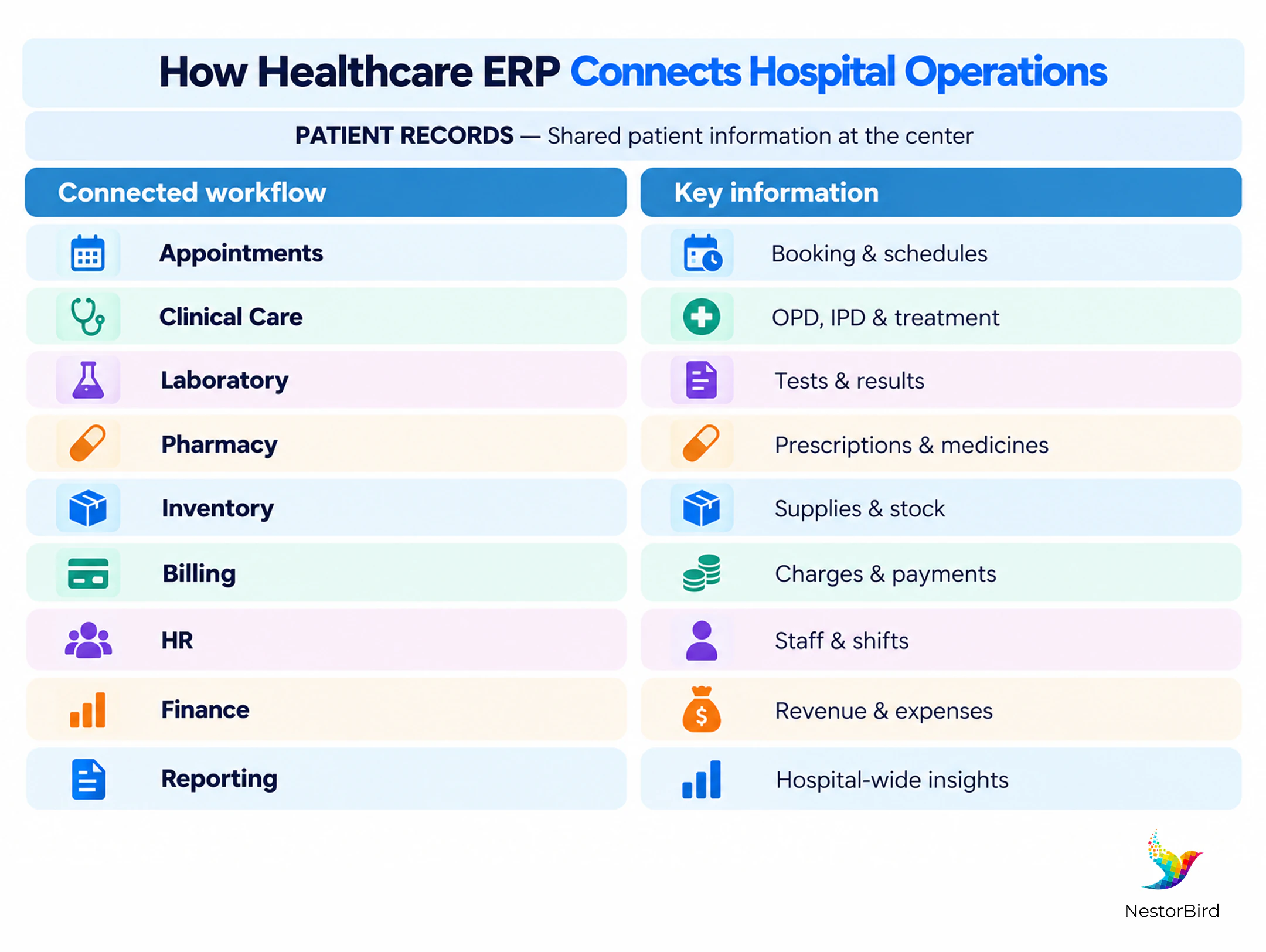
A hospital ERP becomes useful when a change in one department is reflected in the workflows that depend on it. Common modules include:
Module | Core Function | Operational Value |
|---|---|---|
Clinical & patient management | Registration, appointments, OPD/IPD and treatment workflows | Coordinated patient journey |
Pharmacy & laboratory | Prescriptions, diagnostic requests, reports and medicine stock | Connected clinical support services |
Inventory & procurement | Medical supplies, reorder needs, purchase orders and receipts | Better visibility into material availability |
Billing & finance | Service charges, invoices, payments and financial records | Clearer revenue and expense tracking |
HR & administration | Staff records, attendance, shifts and payroll | More coordinated workforce administration |
Clinical and Patient Management
Registration and appointment data support consultations, admissions, transfers and discharge activities. Staff can track a patient’s current stage of care where the configured system supports it.
Pharmacy, Laboratory, and Inventory
Prescriptions can be connected to pharmacy workflows, while diagnostic requests and results can be associated with patient records. Stock and purchasing modules help teams monitor medicines, consumables and replenishment needs.
Billing, Finance, and Administration
Consultations, tests, procedures and pharmacy transactions can feed billing. Finance and HR modules connect the patient-facing workflow to payments, expenses, staffing and management reporting.
See how Swanity hospital management software brings these clinical, pharmacy, laboratory and billing workflows onto one platform.
How Healthcare ERP Supports Hospital-Wide Decision-Making
Connected records help hospital leaders understand what is happening across departments, rather than assembling reports from separate spreadsheets. Depending on configuration and data quality, dashboards can show:
Patient flow, appointments, admissions and bed availability.
Pharmacy stock, expiring items and purchasing needs.
Department activity, staff scheduling and resource utilization.
Outstanding bills, collections, expenses and financial performance.
Operational trends that may require management attention.
Healthcare ERP improves the availability of operational information; it does not independently guarantee better clinical outcomes. The value depends on timely data entry, suitable reports and staff acting on the information.
What Does Healthcare ERP Implementation Involve?
Healthcare ERP implementation starts with the hospital’s real workflows, not a standard software checklist. A practical rollout typically includes these stages:
1. Requirement Analysis
Identify clinical, operational and reporting needs.
2. Workflow Mapping
Document how patients and information move between teams.
3. Data Migration
Clean and transfer patient, item and financial records.
4. Configuration & Customization
Set up modules, permissions and hospital-specific workflows.
5. Integration
Connect existing EHR, laboratory, imaging or other systems where needed.
6. Testing
Check realistic scenarios, security and data accuracy.
7. Staff Training
Prepare clinicians, administrators and support teams.
8. Go-Live & Support
Launch in phases where appropriate and resolve issues.
Hospitals should establish privacy safeguards, backup arrangements, interoperability requirements and clear ownership for each implementation stage. For a real-world example, see this healthcare ERP implementation case study.
Healthcare ERP vs. Hospital Management System: What’s the Difference?
These terms often overlap. A hospital management system generally emphasizes hospital-specific clinical and administrative tasks, while healthcare ERP can extend those workflows into broader organizational functions.
Aspect | Hospital Management System | Healthcare ERP |
|---|---|---|
Primary focus | Patient-facing and hospital administration | Clinical and organization-wide operations |
Typical scope | Registration, appointments, admission and billing | Patient workflows plus inventory, procurement, finance and HR |
Relationship | May include ERP-style modules | May include a complete hospital management system |
The better question is not which label a vendor uses, but whether the system covers the hospital’s required workflows and integrations.
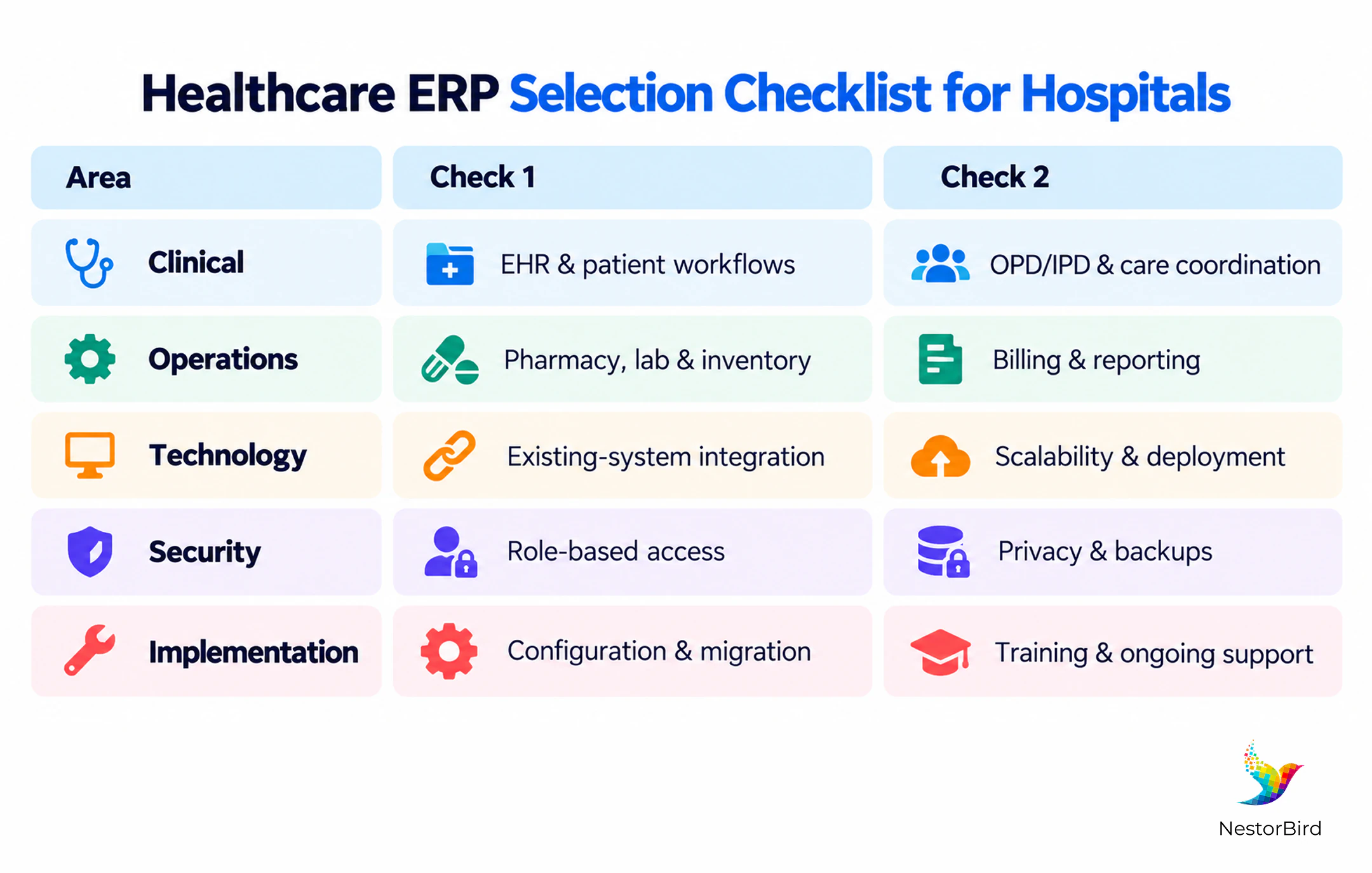
What Should Hospitals Consider Before Choosing Healthcare ERP Software?
Selection should reflect the hospital’s size, specialties, existing applications and growth plans. Evaluate the following before committing to a system:
Clinical workflows and electronic health record requirements.
Pharmacy, laboratory, inventory and billing coverage.
Integration with existing hospital information systems.
Security, access controls, backups and applicable privacy requirements.
Reporting, customization, deployment options and long-term support.
Explore how ERPNext healthcare solutions handle customization, scalability and healthcare-specific requirements.
Conclusion
Healthcare ERP connects much more than patient records. It links registration, consultations, diagnostics, pharmacy, billing and discharge with inventory, finance, staffing and reporting. This shared operational picture helps hospital teams coordinate work and gives managers access to more timely information. The right solution should reflect actual care pathways, protect sensitive data and integrate with the systems staff already use. Successful adoption depends as much on implementation and training as it does on software features.

Frequently Asked Questions
Healthcare ERP software connects patient-related workflows with hospital administration, inventory, finance and reporting through integrated modules.
It shares relevant updates across connected departments, allowing authorized teams to follow a patient’s journey from registration through treatment and billing.
Common modules include patient management, EHR, appointments, OPD/IPD, pharmacy, laboratory, inventory, billing, finance, HR and analytics.
A connected ERP can link EHR information with appointments, diagnostics and billing while applying role-based access to sensitive clinical records.
Hospital management software emphasizes hospital workflows; healthcare ERP may additionally connect procurement, finance, workforce management and wider organizational operations.
It reduces disconnected information, supports cross-department coordination and provides more timely visibility into patient flow, stock and finances.
Prioritize workflow mapping, secure migration, integrations, access controls, realistic testing, staff training and ongoing support.
Many solutions support integrations, but compatibility depends on the existing systems, available interfaces, data standards and project scope.