
Quick Summary
Pharma ERP helps pharmaceutical teams manage expiry dates, retest schedules, batch-wise inventory, quality holds, and stock movements from one connected workflow. With accurate batch records and configured alerts, teams can identify near-expiry stock, prioritize eligible inventory, trace movements, and make better purchasing, warehouse, quality, and dispatch decisions.
Table Of Contents
Introduction
Expired stock, missed retest dates, disconnected batch records, and manual inventory updates can make pharmaceutical inventory difficult to control. Pharma ERP brings inventory, purchasing, warehouse movements, production, and quality records into a connected workflow. This gives teams clearer batch-level visibility so they can identify near-expiry stock, manage quality decisions, trace movements, and act before inventory problems become operational issues.
Key Takeaways
Expiry alerts help teams identify products approaching their applicable use-by dates.
Retest monitoring helps schedule reassessments and manage stock pending an authorized quality decision.
Batch-wise inventory tracking connects quantities with batch histories, dates, statuses, and warehouse locations.
FEFO prioritizes eligible inventory with the earliest expiry date while respecting quality restrictions.
Integrated pharmaceutical inventory management improves visibility across purchasing, quality, storage, production, and dispatch.
Expiry Date Management in Pharmaceutical Inventory
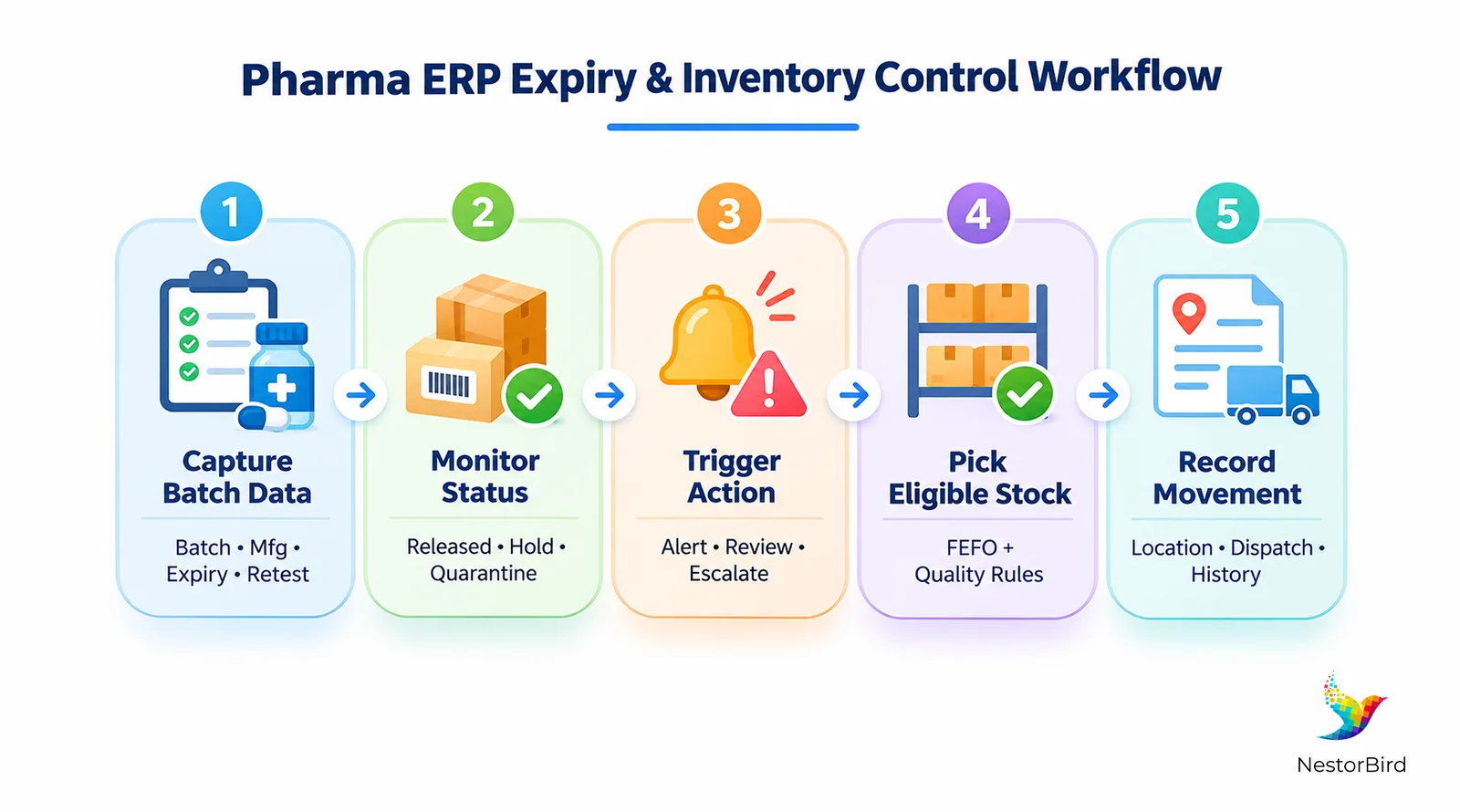
Pharma ERP manages expiry at the batch level by recording the applicable expiry date against raw materials, intermediates, and finished products. The system can then use those dates to support alerts, near-expiry reports, stock-status controls, and batch-aware picking or dispatch workflows.
How does expiry tracking work?
Capture the expiry date when the batch is received or created.
Associate the date with the relevant batch, quantity, warehouse, and inventory status.
Generate configurable alerts before the expiry threshold is reached.
Show near-expiry stock in reports so responsible teams can review it.
Prevent expired stock from routine use or dispatch according to approved procedures.
The important point is that an expiry date should not sit in a separate spreadsheet from the quantity and location. Teams need to know which batch is affected, how much stock remains, where it is stored, and what action is required.
Practical example: finding near-expiry stock
Imagine a distributor has the same medicine stored in three warehouse locations. A centralized inventory view can identify all batches approaching expiry, show their quantities and locations, and help the team decide what action is permitted under its approved process. This is much more useful than discovering an expired batch during a manual stock check.
For a broader view of integrated pharma workflows, explore the inventory management software for pharma manufacturing resource.
Managing Retest Dates and Quality Holds
Expiry and retest dates are not interchangeable. An expiry date marks the applicable end of a product’s shelf life. A retest date indicates when a material is due for reassessment under an approved procedure. A retest does not automatically extend shelf life or authorize release; continued use or any extension must follow applicable requirements and approved procedures.
Expiry Date | Retest Date | Purpose | Required Action |
|---|---|---|---|
End of applicable shelf life | Point for reassessment | Defines whether stock remains within its applicable shelf life | Follow approved expiry/disposition procedure |
Not a quality review date | Quality review trigger | Prompts reassessment where a retest is applicable | Record the authorized quality decision |
May make stock ineligible after the date | May place material on hold pending review | Controls stock status | Do not release solely because a retest was completed |
How ERP-supported retest control helps
A configured workflow can flag upcoming retests, notify responsible quality users, move stock into a pending-review or quality-hold status where appropriate, and preserve the decision in the batch history. This gives warehouse and quality teams a shared status instead of relying on separate reminders.
Batch-Wise Inventory Tracking and Traceability
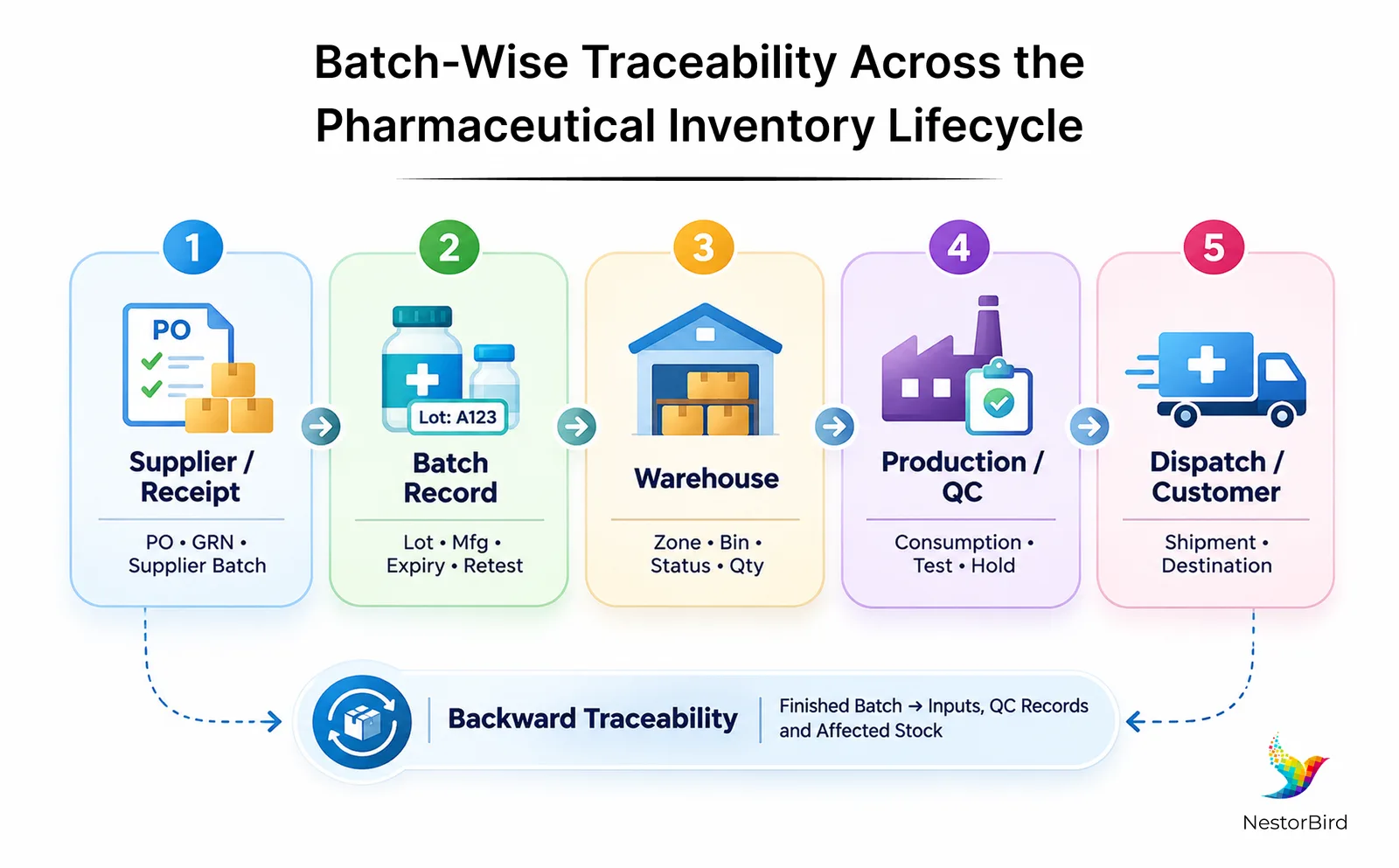
Batch-wise inventory management links each lot to its product identifier, manufacturing or receipt details, expiry or retest dates, quantity, location, and quality status. Every relevant stock movement can then be connected to that batch history.
What does batch traceability mean?
Forward traceability follows material from receipt or production into storage and later movements. Backward traceability works in the opposite direction: it helps teams trace a finished batch back to the inputs, records, and transactions connected to it.
Example: tracing one finished-product batch
Suppose a quality investigation identifies finished batch FP-2407. The team needs to know how much remains, where it is stored, which production inputs were used, what quality records are associated with it, and where units were dispatched. A batch-aware inventory history can bring those records together for investigation and recall coordination.
For more context on batch records and production workflows, see batch processing in pharmaceutical manufacturing.
FEFO, FIFO, and Better Stock Rotation
FEFO means First Expiry, First Out. FIFO means First In, First Out. In pharmaceutical inventory, FEFO is often more useful when eligible batches have different expiry dates because the oldest receipt is not necessarily the batch that expires first.
Method | Best Used For | Important Control |
|---|---|---|
FEFO | Stock with different expiry dates | Pick the eligible batch with the earliest expiry, subject to status and quality rules |
FIFO | Inventory where receipt age is the main rotation factor | Do not let receipt order override expiry restrictions or quality holds |
A simple FEFO example
Batch A was received first but expires in December. Batch B was received later but expires in October. If both are otherwise eligible, FEFO would prioritize Batch B because it reaches expiry sooner. The ERP should still respect blocked, quarantined, or quality-held stock rather than treating expiry date as the only picking rule.
How Pharma ERP Software Connects Inventory and Warehouse Operations
A standalone inventory tracker may show quantities, but an integrated Pharma ERP can connect purchasing, warehouse movements, production consumption, quality inspections, stock holds, and dispatch records. The benefit is not simply having more dashboards; it is having the same batch and status information available to the teams making day-to-day decisions.
Purchasing records can connect incoming materials with supplier and batch details.
Warehouse teams can see batch-aware stock by location, bin, quantity, and status.
Production records can connect batch consumption with the resulting output.
Quality teams can record inspection decisions and control stock eligibility.
Dispatch teams can use eligible batch information and preserve shipment history.
Regulatory compliance depends on appropriate configuration, validated processes where required, data integrity, training, and operational controls—not on software alone.
If you are evaluating the wider solution landscape, review pharmaceutical manufacturing ERP solution and Pharma ERP implementation and modules.

Key Features to Evaluate in a Pharmaceutical Inventory Management System
When comparing pharmaceutical inventory software, do not judge the product only by the number of features listed on a brochure. Check whether each function is available natively, requires configuration, or needs customization for your workflow.
Feature | What to Check |
|---|---|
Expiry and retest tracking | Configurable dates, alerts, reports, and review workflows. |
Batch and lot traceability | Batch-linked quantities, movements, locations, and history. |
Inventory status controls | Quarantine, quality hold, released, and rejected statuses where appropriate. |
Audit trails and access control | Traceable changes and controlled access to critical records. |
Warehouse visibility | Location- and bin-level stock with batch-aware movements. |
Operational integrations | Connections across procurement, production, quality, and dispatch. |
Management reporting | Near-expiry stock, inventory accuracy, write-offs, overdue retests, and batch history. |
For a pharma-specific software evaluation, explore pharmaceutical ERP software and compare the capabilities with your current inventory process.
Practical Steps to Improve Pharmaceutical Inventory Control with ERP
Standardize master data: Clean product codes, batch identifiers, expiry dates, retest dates, and warehouse locations before migration or configuration.
Define inventory rules: Document how expiry alerts, retest schedules, quality holds, and stock eligibility should work.
Configure alerts and reports: Set warning periods, responsible users, and escalation procedures that match the operating process.
Establish FEFO procedures: Align batch allocation, picking, and dispatch with approved stock-rotation rules.
Train relevant teams: Make responsibilities clear for warehouse, purchasing, production, and quality users.
Monitor KPIs: Review expiry-related write-offs, near-expiry stock value, inventory accuracy, overdue retests, and batch-trace time.
Review and improve: Use periodic checks to identify incorrect records, missed alerts, and workflow gaps.
For a broader view of how ERP can address pharmaceutical operational challenges, see ERP solutions for pharmaceutical operations.
Conclusion
Pharma ERP can make pharmaceutical inventory management easier to control by connecting expiry monitoring, retest scheduling, batch-wise tracking, FEFO, warehouse movements, and quality decisions. The strongest results come when the system is supported by accurate master data, clearly defined workflows, trained teams, and approved quality procedures.
For pharmaceutical manufacturers and distributors evaluating integrated operations, the next step is to map the current inventory workflow, identify where expiry or batch visibility breaks down, and then assess which ERP capabilities can close those gaps.

Frequently Asked Questions
Pharma ERP is an integrated system that can connect pharmaceutical inventory with purchasing, production, quality, warehousing, and related operations. The exact capabilities depend on the solution and how it is configured for the business.
Expiry dates can be associated with individual batches and monitored through alerts, reports, and inventory-status workflows. Teams can use this information to identify near-expiry or expired stock and take the appropriate action under approved procedures.
An expiry date marks the applicable end of a product's shelf life. A retest date indicates when certain materials are due for reassessment. Retesting does not automatically extend shelf life or authorize use; any continued use must follow applicable requirements and approved procedures.
Inventory is recorded and monitored by batch or lot, including quantities, dates, locations, quality status, and stock movements. This creates a history that can support stock control, investigations, and recall coordination.
FEFO means First Expiry, First Out. It prioritizes eligible inventory with the earliest expiry date, which can support better stock rotation when batches have different expiry dates. Quality holds and other restrictions must still be respected.