

Quick Summary
A successful ERP implementation requires more than just buying software. You need clear goals, clean data, proper vendor selection, and a team ready to adopt the new system. This blog explains the key steps to ensure your ERP system delivers real business value without the usual stress and delays.
Table Of Contents
Introduction
For any business niche and size, implementing new software for daily operations is a significant choice. Although an ERP system can help organize data and boost efficiency, many ERP projects encounter delays, exceed budgets, or do not meet expectations. This often occurs because of insufficient planning and neglecting the human aspect of change. In this blog post, we offer a clear and practical guide to assist you in managing this complicated process. We will highlight the essential strategies and actions needed to make sure your ERP software implementation is successful and provides genuine value to your organization.
Key Takeaways
Define clear goals before selecting enterprise resource planning software.
Clean all data before moving it to the new ERP system.
Clean all data before moving it to the new ERP system.
Pick a vendor with proven ERP implementation services.
Keep support active after go-live to fix issues fast.
Why Planning Before Software Matters
Even from the first phase or the pre-implementation stage, many companies rush to pick software. This is a mistake. Before looking at any enterprise resource planning software, you must first define what business problems you want to solve. Success is not just about going live on a set date. True success means achieving a measurable goal, like closing monthly accounts five days faster. This clarity guides every decision that follows.
Another critical step during this early phase is introducing change management in ERP. You cannot wait until the software is ready to inform your team. Identify leaders within your company who can support the project from day one. Their role is to explain the reasons for the new system to others and encourage participation.
Check out the ERP Implementation Plan.
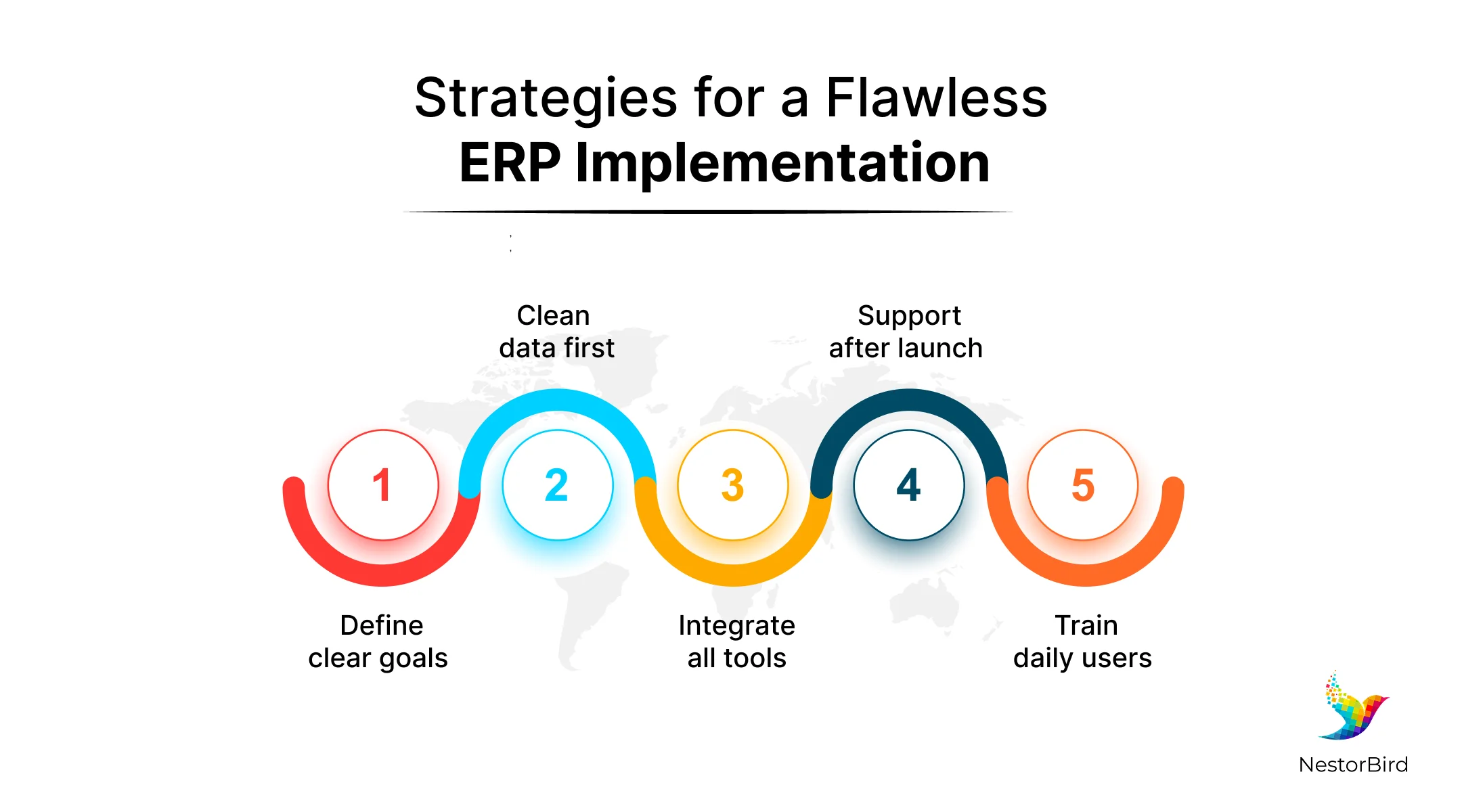
Strategies for a Flawless ERP Implementation
Based on our discussion about planning, here are five simple actions you can take to make your implementation of ERP run smoothly and deliver the results your business needs.
1. Fix Your Data Before Moving It
Your new software will only be as good as the information you put into it. Before you start, check all customer, vendor, and product records for mistakes or duplicates. A successful ERP system needs this data to be correct from day one. You should assign one person to be responsible for each data type, and recheck all your financial numbers to ensure they match your bank and tax records exactly before the switch.
2. Connect Your Tools Early
Your new software should not stand alone. It needs to talk to your other tools, like your website or billing system. You should definitely plan for ERP system integration right at the start, so data flows automatically between all platforms. This stops your team from entering the same information twice. You can now map out every connection you need and use simple connectors or APIs to link everything. This creates one smooth tech setup for your whole company.
Learn more on ERP for Pharmaceutical Industry.

4. Help Your Team Want to Use It
Look at your daily repetitive tasks and set the system to handle them. This is called business process automation. For example, configure the software to automatically send purchase orders for approval when stock runs low. This removes manual chasing and paper-based steps. It also ensures everyone follows the same rule every time. Your team can then focus on more important work instead of routine approvals.
5. Stay Around After Going Live
The day you start using the new system is not the finish line. Plan for a few weeks of extra support right after, often called the hypercare period. During this time, keep your ERP implementation team available to solve small problems quickly. Here, you can watch how the system performs under real workload and fix issues immediately. This extra attention in the first month prevents small frustrations from becoming big failures later.
How to Pick the Right Software Partner
The best ERP partner you choose here for implementation can help you to achieve a smooth process and avoid common mistakes. Many companies only compare feature lists, but this is not enough. You must also look at the vendor’s experience in your specific industry, and ask if they have worked with similar businesses before.
Also, check if their enterprise resource planning software can handle your growth over the next five years. A good partner will not just agree to every request you make. They will question your old ways of working and suggest better methods based on what they have seen work for others. They will also offer reliable ERP implementation services with clear timelines and support commitments.
Get the best Manufacturing ERP.
Conclusion
Installing new enterprise resource planning software for your company requires effort, but it can be a smooth process if done correctly. When you follow these steps, your ERP software implementation has a much higher chance of working as intended. Remember that the right technology partner also makes a significant difference in how smoothly the process goes. If you are looking for a reliable partner, you should explore solutions from NestorBird. We focus on building practical, industry-specific platforms that are ready to use from day one, making your transition simpler and more effective.
Frequently Asked Questions
The time depends on your company's size and needs. For a small or medium-sized business, it usually takes three to six months. Larger companies with complex needs can take twelve months or more.
Yes, absolutely. Your new enterprise resource planning software needs accurate information to work correctly. Cleaning customer, vendor, and inventory data before migration prevents errors and ensures reports are reliable from day one.
Some customization is often possible, but too much can cause problems. It makes the system complex, expensive to maintain, and harder to update. Try to adapt your processes to the software's best practices whenever possible.