

Quick Summary
Clinic management software solves multi-doctor scheduling conflicts through real-time calendars and automatic conflict detection. It prevents double-booking, manages walk-ins, and balances patient load across doctors. This helps your front desk work efficiently, reduces staff stress, and ensures every patient sees the right doctor at the right time.
Table Of Contents
Introduction
When hospitals or clinics manage multiple doctors, which is common, the front desk frequently faces disorder. As the number of doctors grows, manual approaches such as paper rosters or simple digital calendars prove inadequate. They fail to display current availability across various practitioners. This blog post explains how modern clinic management software resolves these issues. It stops overlapping bookings and maintains orderly operations. The appropriate doctor scheduling software works here as a unified platform for your entire practice, keeping all schedules harmonized. We will learn why clinic management software is a viable solution for such challenges.
Key Takeaways
Real-time calendars prevent double-booking across multiple doctors.
Automated conflict detection blocks overlapping appointments instantly.
Walk-in patients get managed without disturbing scheduled bookings.
Load balancing ensures no doctor is overbooked or underused.
Integration with existing systems streamlines overall clinic operations.
The Real Problem: Why Multi-Doctor Scheduling Breaks Down
Let us first understand the main problem or the major challenges that your clinic can face with multiple doctors. When you rely on paper registers, separate spreadsheets, or different digital calendars for each doctor, things get messy quickly. Your staff updates schedules in different tools, and that is why overlaps happen so often. One person books a slot in one system, while another books the same slot elsewhere. This is a major issue.
Walk-ins Create Hidden Conflicts
Walk-in patients add more confusion. Your front desk team may not know which slots are truly free. Pre-booked appointments already fill the calendar, but walk-ins get squeezed in anyway. This creates invisible clashes that patients notice only when they wait too long.
Doctor Leaves and Room Changes
Doctor leave requests, shift changes, and room availability often do not sync automatically. Staff must manually check everything, which takes time and leads to mistakes. This is where clinic workflow automation becomes helpful. It connects all schedules. Proper availability management ensures everyone sees the same real-time information, so your clinic runs without constant scheduling headaches.
How Clinic Management Software Solves Scheduling Conflicts
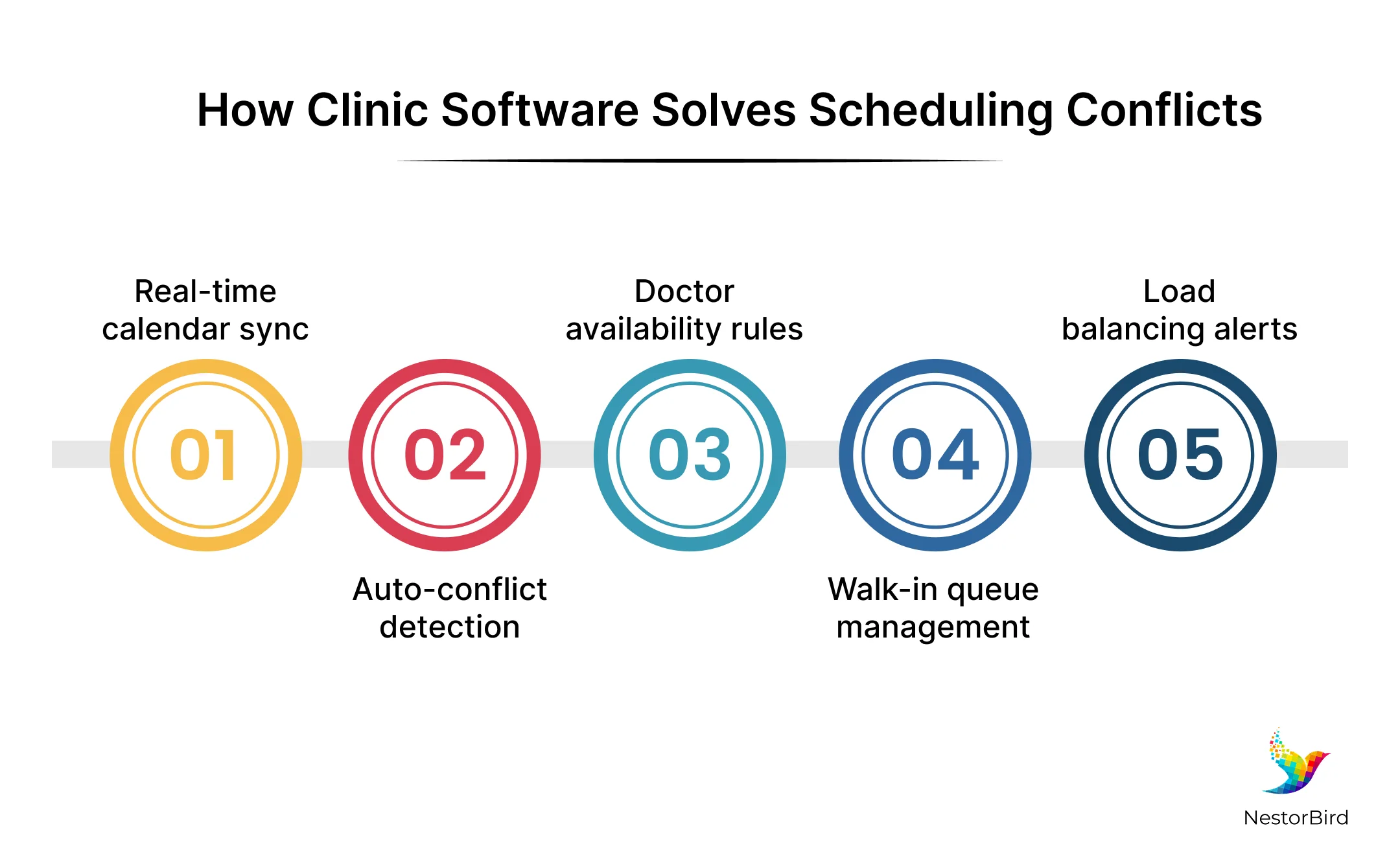
Understand that implementing a good and suitable clinic management software directly targets the root causes of scheduling chaos. It replaces fragmented systems with a unified digital platform. Here is how this technology solves conflicts at a practical level.
Centralized Real-Time Calendar
This gives you one single screen showing every doctor’s schedule at once. Your front desk staff can view all availability instantly without switching between different tools or papers.
Conflict Detection Engine
The system automatically blocks a slot the moment it gets filled. No two patients can ever be assigned to the same doctor at the exact same time.
Doctor-Specific Availability Rules
You can set working hours, break times, and leave dates for each doctor. The system enforces these rules automatically, so nobody books outside permitted slots.
Resource Scheduling Integration
The software also handles room and equipment availability alongside doctor schedules. This ensures all required resources are free when an appointment is created.
Intelligent Overlap Prevention
The system checks every new booking against existing appointments, leaves, and room usage. It immediately warns you if anything conflicts before saving the entry.
Doctor scheduling software like this ensures your practice runs smoothly. A proper clinic scheduling system gives your team confidence that every booking is valid and conflict-free. Strong availability management protects your clinic from costly double-booking errors every single day.
This is why hospitals are underusing patient portals.

Smart Features That Keep Multi-Doctor Clinics Running Smoothly
There are some important features that go beyond just preventing double-booking. These smart tools help your multi-doctor clinic run efficiently every day. Keep in mind that these capabilities save your staff time and reduce stress.
Role-Based Access Control
Different staff members see only what they need for their job. Receptionists view booking slots, while doctors can manage their own schedules without interfering with others.
Patient Queue Management
Walk-in patients get assigned dynamically without disturbing your pre-booked appointments. Patient queue management keeps the flow smooth and organized throughout the day.
Automated Reminders and Rescheduling
The hospital appointment scheduling system sends automatic appointment reminders to patients. This reduces no-shows and helps you fill cancelled slots quickly with other waiting patients.
Load Balancing Between Doctors
The software flags when one doctor is overbooked while another has free time. You can then redirect patients to available doctors, improving overall clinic efficiency.
Know more about Top IPD OPD and Lab Management Software.
Smart Resource Allocation
The system tracks room usage and equipment availability alongside doctor schedules. This ensures all necessary resources are ready when patients arrive for their appointments.
Comprehensive Staff Coordination
Healthcare staff scheduling software helps manage all team members effectively. A complete healthcare appointment management system connects every part of your practice. The patient appointment scheduling system gives patients easy access while maintaining full control for your clinic.
What to Look For When Choosing the Right Software
Check if the software supports separate calendars for each doctor with automatic conflict detection.
Ensure it can handle walk-in patients alongside scheduled appointments without disrupting existing bookings.
Verify it integrates smoothly with your current EMR or billing systems for seamless data flow.
Look for a patient appointment scheduling system that allows patients to book online with real-time availability.
Choose a system that is easy for your front desk staff to learn and use every day.
Confirm that doctors and staff can access schedules from mobile devices when away from the clinic.
Make sure you can export reports and scheduling data when needed for analysis or compliance purposes.
Always choose the right digital healthcare solutions for hospitals.
Conclusion
For clinics, it is important to pick a system that fits your daily needs. Manual scheduling creates stress for your staff and patients. The right software stops double-booking, manages walk-ins, and keeps everyone informed. A good system grows with your practice as you add more doctors. Solutions like Swanity from NestorBird offer these capabilities in one platform. They help you run a smoother clinic with better coordination. So, investing in reliable scheduling tools is a smart decision for any growing practice.

Frequently Asked Questions
Yes, the system checks all existing appointments before saving a new one. It immediately blocks any slot that gets filled, so two patients cannot book the same doctor at the same time.
Walk-ins are added to a separate queue without disturbing pre-booked appointments. The system dynamically assigns them to available slots as gaps emerge during the day.
Yes, doctors can set their working hours, break times, and leave dates. The system enforces these rules automatically and prevents any bookings outside these permitted slots.