
Quick Summary
ERP for Manufacturing helps production teams connect machine downtime with the production order affected by the stoppage. Instead of seeing only a breakdown duration, managers can see the affected job, planned and actual output, pending quantity, available capacity, and delivery impact. This makes it easier to reschedule work, investigate recurring downtime, and make faster production decisions.
Table Of Contents
Introduction
A machine can be down for two hours, but the real business question is not simply, “How long was the machine stopped?” Production managers need to know, “Which order was affected, how much output is now pending, and what should we do next?” ERP for Manufacturing connects downtime events with production orders, schedules, actual output, capacity, and delivery commitments. This turns downtime data into information teams can act on.
Key Takeaways
Downtime becomes more useful when each stoppage is linked to the production order it affects.
ERP can connect machines, work centres, production orders, planned quantities, actual output, and schedules.
Planned and unplanned downtime should be separated so expected stops are not confused with recurring problems.
Downtime can affect order completion, machine availability, work-in-progress, capacity, and delivery dates.
Accurate timestamps and consistent reason codes are essential for reliable downtime reports.
Reports support better decisions, but reporting alone does not prevent breakdowns or guarantee on-time delivery.
Why Tracking Machine Downtime Against Production Orders Matters
Tracking downtime against production orders connects a machine stoppage to the job that was running, the quantity that was planned, the output already completed, and the quantity still pending.
This matters because a maintenance log can tell you that a machine was unavailable for 90 minutes, but it may not tell production which customer order is now at risk.
When the records are connected, the production manager can quickly answer:
Which production order was affected?
Which operation or work centre was running?
How much production time was lost?
How much output is complete?
How much quantity remains?
Does the schedule or delivery commitment need to change?
A connected manufacturing ERP software workflow helps bring these records into a common manufacturing process.
How Manufacturing ERP Connects Machine Downtime to Production Orders
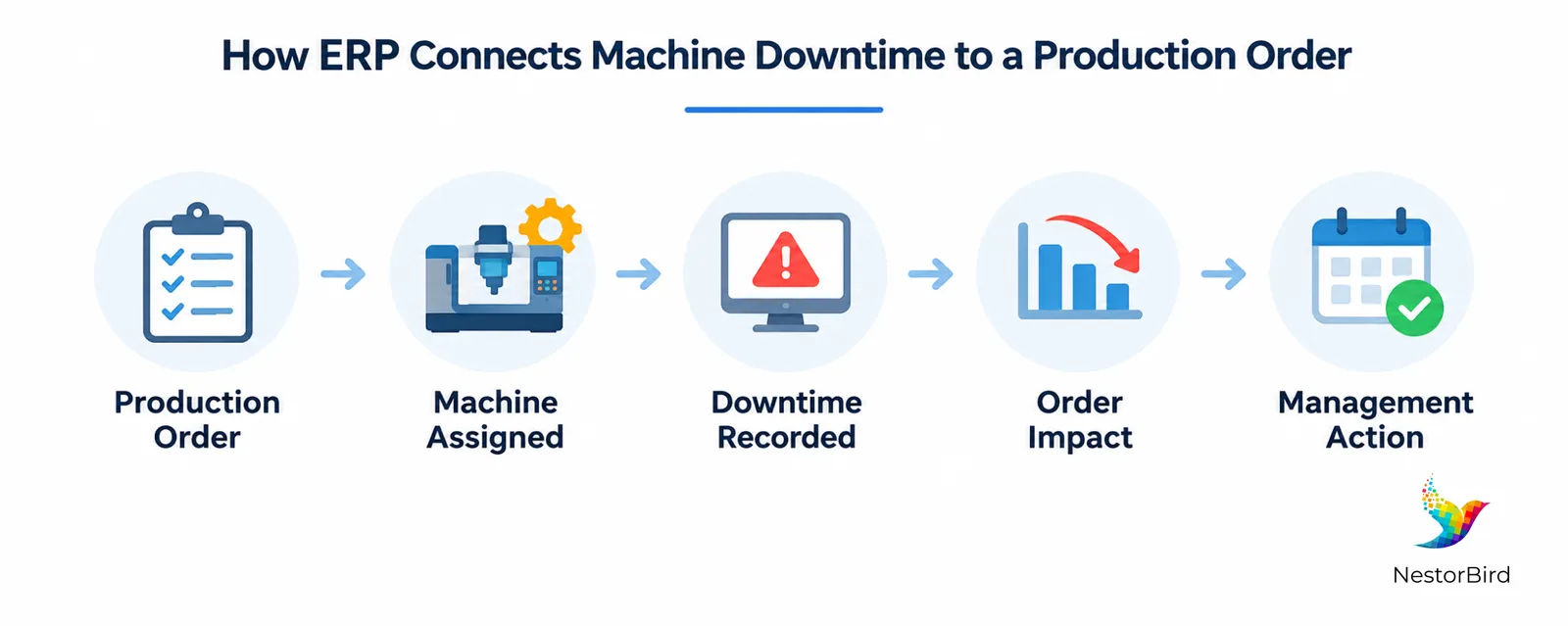
The basic workflow is simple: the production order defines what needs to be made and when; downtime records explain when the assigned machine or work centre could not run. Connecting the two shows the operational impact of the stoppage.
Production order scheduled — planned quantity, operation, work centre, and expected completion date are defined.
Machine assigned — the relevant machine or work centre is connected to the operation.
Downtime recorded — start time, end time, duration, and reason are captured.
Affected order identified — the downtime event is associated with the relevant production activity when the configured workflow supports it.
Actual output reviewed — completed quantity is compared with planned quantity.
Schedule revised — the manager decides whether to reschedule, use another work centre, or review the delivery commitment.
The result is a much more useful question: “Production Order 1842 was running on Machine 04 when the stoppage occurred. What quantity is now pending, and what is the best recovery option?”
For a broader manufacturing workflow, see ERP for manufacturing and review how production information can be connected with other operational processes.
What Machine Downtime Data Should Manufacturers Track?
You do not need dozens of fields to start. You need the fields that allow production and maintenance teams to understand what happened and decide what to do next.
Data point | What it records | Why it matters |
|---|---|---|
Machine / work centre | Equipment and production area | Identifies where capacity was lost |
Production order / operation | Affected job and operation | Connects downtime to order impact |
Start / end / duration | Exact downtime period | Supports accurate loss analysis |
Planned / unplanned | Type of stoppage | Separates scheduled stops from unexpected losses |
Reason code | Breakdown, setup, changeover, shortage, quality hold, operator availability, etc. | Helps identify recurring causes |
Planned vs. actual output | Expected and completed quantity | Shows output gaps and pending quantity |
Maintenance / restart status | Action taken and recovery state | Supports follow-up and accountability |
Keep downtime reason codes simple and consistent. If sensors, PLCs, or machine-monitoring systems are integrated, some data may be captured automatically. Otherwise, operators or supervisors may need to record events manually.
Planned vs. Unplanned Downtime: Understanding the Production Impact
Not every machine stop means the same thing. Scheduled maintenance and changeovers are different from unexpected equipment failures.
Downtime type | Example | Production impact | Management response |
|---|---|---|---|
Planned | Scheduled maintenance | Capacity is intentionally reserved | Plan production around the stop |
Planned | Setup or changeover | Production pauses between jobs | Include expected time in scheduling |
Unplanned | Equipment breakdown | Unexpected capacity loss | Investigate cause and adjust the schedule |
Unplanned | Material shortage / quality hold | Order may wait even when equipment is available | Coordinate materials, quality, and production |
Separating the categories helps managers distinguish expected production constraints from recurring problems that may require corrective or preventive action.
How Downtime Affects Production Orders, Machine Utilization, and OEE
A stoppage can reduce machine availability, slow order completion, increase work-in-progress, and push planned delivery dates. It can also affect equipment performance metrics.
Overall Equipment Effectiveness (OEE) combines availability, performance, and quality. Downtime primarily affects availability, while production speed and accepted output affect the other components. Machine utilization is related, but it is not the same as OEE.
Measure | What it shows | Useful question |
|---|---|---|
Downtime duration | Time equipment was stopped | How long was the stoppage? |
Machine utilization | How much available capacity was used | Was the machine being used as planned? |
OEE | Availability, performance and quality | How effectively did equipment produce good output? |
Order completion | Production-order progress | Is the order still on schedule? |
Reliable analysis requires consistent definitions for scheduled production time, planned stops, operating time, production counts, and quality.
Practical Example: Tracking a Delayed Production Order in ERP
Consider this hypothetical example: a machine is scheduled to produce 1,000 units during an eight-hour production order. An unexpected two-hour breakdown interrupts the run.
Event | ERP view / management question |
|---|---|
Planned production | 1,000 units scheduled |
Downtime event | Two-hour unexpected breakdown recorded |
Actual output | How much has actually been completed? |
Pending quantity | How much remains on the order? |
Capacity review | Is another work centre available? |
Next decision | Reschedule, reallocate, or review the delivery commitment |
The two-hour stoppage should not automatically be treated as exactly 25% less output. Actual loss depends on operating rate, recovery time, production sequence, and other constraints.
The value of ERP is therefore not just calculating lost minutes. It is connecting those minutes to the production order so the manager can make a better recovery decision.
Manufacturing ERP vs. Standalone Machine Downtime Tracking Software
These tools can solve different parts of the same problem.
Area | Standalone downtime tool | Manufacturing ERP |
|---|---|---|
Primary purpose | Machine states, event capture, alerts and equipment analysis | Connected manufacturing and business workflows |
Machine visibility | Often strong where sensors/PLC integrations exist | Depends on configured integrations and data capture |
Order context | May be limited | Can connect downtime with production orders |
Planning context | Usually narrower | Can connect with production planning and scheduling |
Business context | Equipment-focused | Can connect production with inventory, costs, maintenance and reporting |
A machine-monitoring or MES platform may capture shop-floor signals, while ERP uses compatible data to connect equipment events with production orders and wider business workflows.
ERP should not be assumed to automatically detect every breakdown. Automatic detection generally requires suitable machine integrations, sensors, PLCs, or configured monitoring systems.
How to Use Downtime Reports to Improve Production Planning
A downtime report is useful only when it helps someone make a better decision. Production and maintenance teams can use the information to:
Identify machines with recurring stoppages.
Identify production orders most affected by downtime.
Compare planned and actual output to find capacity shortfalls.
Review downtime reasons and coordinate corrective or preventive maintenance.
Reassess schedules based on available capacity, order priority, material availability, and delivery commitments.
Track repeat downtime, downtime duration, affected orders, and schedule adherence over time.
When downtime changes available capacity, connect the analysis with production planning and scheduling to support more informed schedule changes.
A connected manufacturing data approach can also reduce the need to reconcile production information from disconnected records.

What to Check Before Implementing ERP-Based Downtime Tracking
Confirm compatibility with existing machines, PLCs, sensors, and monitoring systems.
Define consistent downtime categories and production-order identifiers.
Decide which data will be captured automatically and which requires operator input.
Validate timestamp accuracy, production counts, and reporting rules.
Train production and maintenance teams and assign responsibility for data quality.
Assess integration, configuration, and reporting requirements before implementation.
Before implementation, review a manufacturing ERP implementation case study to understand how an ERP workflow can be evaluated against a real manufacturing environment.
The goal is not to capture every possible data point. The goal is to create reliable data that production and maintenance teams can actually use.
Practical Example: ERP for Packaging Manufacturers
Packaging manufacturers can face the same challenge when a machine stoppage affects a job with a committed quantity and delivery schedule. The useful question is not only how long the machine was unavailable, but which order was affected, how much quantity remains, and whether another production resource can help recover the schedule.
For an industry-specific perspective, see ERP for packaging manufacturers and compare the workflow with your own production requirements.
Conclusion
Machine downtime becomes much more useful when it is connected to the production order it affects. Instead of seeing a breakdown as an isolated maintenance event, manufacturers can see the affected job, planned and actual output, pending quantity, available capacity, and possible delivery impact.
ERP for Manufacturing can provide this connected view when the right workflows, integrations, timestamps, reason codes, and production data are in place. With better visibility, production and maintenance teams can identify recurring issues, adjust schedules, coordinate maintenance, and make more informed production decisions.

Frequently Asked Questions
Machine downtime tracking records when a machine stops, how long it remains unavailable, and why the stoppage occurred. Linking the event to a production order reveals its operational impact.
A configured ERP workflow connects machine records, downtime events, production orders, planned schedules, and actual output to identify affected jobs and pending quantities.
Yes, when downtime classifications and reporting workflows are configured appropriately.
Machine-level tools focus on equipment states and event capture, while manufacturing ERP can connect downtime with production orders, inventory, scheduling, maintenance, and business reporting.
Stoppages can reduce output, increase pending quantities, disrupt subsequent operations, and threaten planned completion or delivery dates.
Reliable records help managers identify lost operating time, recurring stoppages, and opportunities to use equipment capacity more effectively.
Downtime affects the availability component of OEE. Performance and quality also influence the overall OEE result.
Automatic detection generally requires compatible sensors, PLCs, machine-monitoring systems, or other integrations. Without them, downtime may need to be recorded manually.
Useful metrics include downtime duration, frequency, reasons, availability, OEE where appropriate, planned versus actual output, affected production orders, pending quantity, and schedule adherence.
Trend and recurring-reason reports can support maintenance planning, capacity adjustments, and more realistic schedules. They improve decision-making but cannot guarantee that future delays will be eliminated.